Would it be a good idea to run Kubernetes on UnRAID?

Kubernetes on Arch Linux in Unraid VMs

Great guide here

Questions:
Would it be a good idea to run Kubernetes on UNRAID?
Also is there a plan to incorporate Kubernetes in UNRAID 7?

Answers:
Running Kubernetes on UNRAID can be done, but there are several factors to consider before deciding whether it’s a good idea for your specific use case.

Advantages of Running Kubernetes on UNRAID:

Challenges:

  1. Complexity: Kubernetes introduces additional complexity compared to using Docker on UNRAID. This might be overkill for home lab environments or smaller setups.
    1. Integration Limitations: UNRAID is primarily designed as a NAS and media server OS, not as a Kubernetes host. Some custom setups (e.g., virtual machines) might be required to run Kubernetes clusters effectively.
    2. Resource Overhead: Kubernetes has a higher overhead compared to running standalone Docker containers. Ensure your UNRAID server has enough resources.
    3. Support: Kubernetes isn’t officially supported by UNRAID, so any issues would require community support or self-troubleshooting.

    Alternative Approaches:

    • K3s: A lightweight Kubernetes distribution that might be more suitable for UNRAID’s typical workloads.
    • Docker Compose: For simpler container orchestration needs, Docker Compose might be sufficient and integrates well with UNRAID.

    Plans for Kubernetes in UNRAID 7

    As of now, UNRAID has not officially announced plans to integrate Kubernetes natively into a future release like UNRAID 7. The focus of UNRAID development tends to revolve around improving storage, virtualization, Docker support, and user experience for NAS and home server applications. If Kubernetes integration becomes a high-demand feature within the UNRAID community, it might influence their roadmap.

    For the latest updates, it’s worth checking:

    • UNRAID forums
    • Release notes for UNRAID 7 (when available)

    If you’re considering Kubernetes on UNRAID, ensure your server hardware can handle it and weigh the complexity against your actual needs.


    Adventures in Git (AIG) Part 2

    Ok, it’s been a while, but I’m getting back into this!

    I have a self-hosted instance of GitLab and now I am going to create repo’s for my live and staging sites of comics.blandford.tk.  My goal is to be able to work locally, have it go up to GitLab, automatically push those changes to ‘staging’ so that I may be able to test that they are working correctly, and finally put those changes ‘live’.

    There are a couple of things to sort out first.

    1.  get the live pages ‘cloned’ to staging
    2.  get staging ‘cloned’ to GitLab
    3.   pull the GitLab copy down to a new project in Nova locally

    Seems easy enough….
    Here are some references I’ll be utilizing to work through this;

    More to come….

    Adventures in Git

    Ok, I’m not the person that uses Git all the time, there I’ve said it. I cheat and direct edit files (a lot)!

    But I’m trying to be better…..

    To that end I’m writing this post(s) to chronicle my journey from sometimes git user to a fully committed (pun intended) user.

    Here’s the plan;

    • set up git on a webserver
    • install GitLab on another server in a Docker container
    • use Nova (Panic’s great editor) on my local machine

    The plan is to push changes from local to GL then have those push mirror to the webserver. Sounds simple right?

    In this way I’ll have a working GitLab instance acting as the hub of any development I do…..


    How to add country blocking to unraid using the Nginx Proxy Manager

    After looking into this I have decided that the amount of effort would not be worth it. Instead I’ve implemented a firewall rule at Cloudflare which challenges any traffic that does not come from the US or Canada. This will stem the tide of bot traffic without blocking legitimate traffic.

    Down the line I’ll set up country blocking in opnSense…..


    SSL Failures Behind NPM

    The title says it all. Occasionally when working on sites I host behind NPM (Nginx Proxy Manager) from the LAN I will have a failure owing to the fact that the SSL cert on the local server is: missing, expired, etc… Running certbot to create certs can be preoblematic behind NPM and would create a different cert than the proxy is serving up, so…. I got the idea to create a cron job on the web server that would;

    1) ssh into unraid
    2) rsync the SSL files down to the appropriate webserver instance
    3) reload nginx

    This will keep the certs in sync and eliminate the pesky SSL issues I was seeing on when accessing sites from behind NPM


    WordPress REST API Misbehavior on Nginx

    Working on this site with the new WP v5.8.2 I was hitting an error when using block editor.

    I installed the ‘Classic Editor’ plugin so that I could keep working…

    The data in the error looked like this…

    Nc@https://www.blandford.tech/wp-includes/js/dist/vendor/react-dom.min.js?ver=16.13.1:72:66

    @https://www.blandford.tech/wp-includes/js/dist/vendor/react-dom.min.js?ver=16.13.1:81:435

    T@https://www.blandford.tech/wp-includes/js/dist/vendor/react-dom.min.js?ver=16.13.1:95:474

    zj@https://www.blandford.tech/wp-includes/js/dist/vendor/react-dom.min.js?ver=16.13.1:230:157

    Th@https://www.blandford.tech/wp-includes/js/dist/vendor/react-dom.min.js?ver=16.13.1:152:225

    tj@https://www.blandford.tech/wp-includes/js/dist/vendor/react-dom.min.js?ver=16.13.1:152:154

    Te@https://www.blandford.tech/wp-includes/js/dist/vendor/react-dom.min.js?ver=16.13.1:146:153

    Te@[native code]

    @https://www.blandford.tech/wp-includes/js/dist/vendor/react-dom.min.js?ver=16.13.1:61:69

    unstable_runWithPriority@https://www.blandford.tech/wp-includes/js/dist/vendor/react.min.js?ver=16.13.1:25:261

    Pg@https://www.blandford.tech/wp-includes/js/dist/vendor/react-dom.min.js?ver=16.13.1:61:16

    ha@https://www.blandford.tech/wp-includes/js/dist/vendor/react-dom.min.js?ver=16.13.1:60:453

    Ja@https://www.blandford.tech/wp-includes/js/dist/vendor/react-dom.min.js?ver=16.13.1:224:402

    ch@https://www.blandford.tech/wp-includes/js/dist/vendor/react-dom.min.js?ver=16.13.1:93:81

    ch@[native code]

    e@https://www.blandford.tech/wp-includes/js/dist/data.min.js?ver=a9e98fe3ad76884fe7909ba8348395b7:2:20892

    t@https://www.blandford.tech/wp-includes/js/dist/data.min.js?ver=a9e98fe3ad76884fe7909ba8348395b7:2:20959

    @https://www.blandford.tech/wp-includes/js/dist/data.min.js?ver=a9e98fe3ad76884fe7909ba8348395b7:2:15083

    b@https://www.blandford.tech/wp-includes/js/dist/data.min.js?ver=a9e98fe3ad76884fe7909ba8348395b7:2:8589

    @https://www.blandford.tech/wp-includes/js/dist/redux-routine.min.js?ver=fd5f93d1f8206c65d1891cf1f898211e:2:1354

    some@[native code]

    r@https://www.blandford.tech/wp-includes/js/dist/redux-routine.min.js?ver=fd5f93d1f8206c65d1891cf1f898211e:2:9237

    @https://www.blandford.tech/wp-includes/js/dist/redux-routine.min.js?ver=fd5f93d1f8206c65d1891cf1f898211e:2:9187

    promiseReactionJob@[native code]

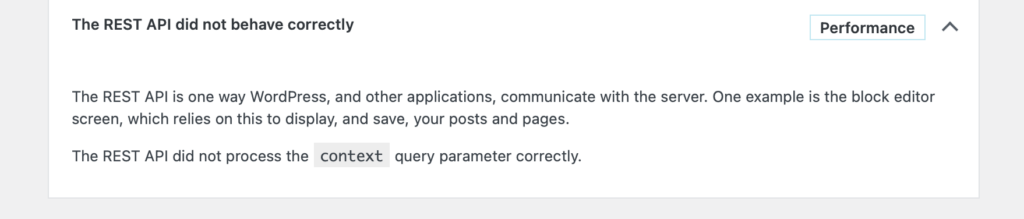
    Site Health (plugin) was giving me this…

    Solution

    I was able to get everything working by making sure that my Nginx site config contained the following:

    location / {
    try_files $uri $uri/ /index.php?$args;
    }

    You have to include the "?$args" part so non-default permalinks doesn't break when using query string

    Lastly don’t forget to restart Nginx so that the changes are applied.

    I hope this helps someone, since I wasted a couple hours getting to the bottom of this. 🙂

    SSL Renewal Mysteries of Nginx Proxy Manager (NPM)

    +

    Using unRAID server to do a ton things…. from running some server VMs to a bunch of Dockers All the web facing bits are being routed through a Docker of NginxProxyManager (NPM).

    NPM takes care of requesting and renewing the SSL certs using LetsEncrypt. However I noticed that there was an issue with them not renewing correctly.

    This story will need to wait for the next auto renewal before I can dig deeper into the issue (should it be unresolved).

    My first steps looking at this I opened the NPM console and did:
    # certbot certificates
    This lists all the certs NPM is managing. I noticed that there was one that was no longer listed in the GUI and thought it could be messing things up…. To remove the cert I did:
    # certbot delete
    This lists all the certs in a numbered list and you can choose a number to delete a single cert, hit ‘c’ to cancel, or just hit enter and delete them all. BE CAREFUL HERE!

    I deleted the offending cert and manually invoked the renewal from the GUI, success!

    So now I’m waiting to see if this was the culprit and if the next renewal goes smoothly… I’ll update in < 90 days…..